urtout
This program urtout can perform different unit root tests in EViews for multiple series simultaneously, and summarize the testing results to a standard format suitable for inclusion in a scholarly publication.
Version
Test Environment
EViews 13.
Basic Syntax
exec urtout(options) series_name1|(para1) series_name2|(para2) …
Default Outputs
The program performs the ADF, DFGLS, PP, KPSS, ERS and NP tests using the command uroot for the given series based on the automatically selected lag parameters or bandwidths, reports the corresponding values of test statistics, and shows whether the null hypotheses are rejected at 1%, 5% or 10% significance level.
Options
- out=obj_name — Specify the name of output table object (default=urtoutput, or urtoutput1, or urtoutput2, …).
- tests=arg — Specify which tests are used:permutations or combination of “a”, “d”, “p”, “k”, “e” or “n” (corresponding the six tests mentioned above). For example, “tests=pka” means performing the PP, KPSS and ADF tests in sequence. Note that all the tests are performed based on the automatically selected lag parameters or bandwidths.
- adf=arg — Use the ADF test based on specified lag orders: two integers such as “13”. The first integer is the minimum lag order, and the sum of the two integers is the maximum lag order. Thus, “13” means performing ADF test from lag order=1 to lag order=4.
- tfmt=integer — Specify the format of output table (from 1 to 2; default=1). The default format may be better looking in EViews. The other format may be more suitable if you plan to copy the table to other editing environments such as Microsoft Word.
- “x”_lagmehod=arg — “x” can be specified as “a”, “d”, “p”, “k”, “e” or “n”, corresponding the option lagmehod for the ADF, DFGLS, PP, KPSS, ERS or NP tests. Please refer to the manual for the use of uroot.
- “x”_hac=arg — “x” can be specified as “p”, “k”, “e” or “n”, corresponding the option hac for the PP, KPSS, ERS or NP tests. Please refer to the manual for the use of uroot.
- “x”_bw=arg — “x” can be specified as “p”, “k”, “e” or “n”, corresponding the option bw for the PP, KPSS, ERS or NP tests. Please refer to the manual for the use of uroot.
- case — Report the cases of the tests:”c”, “t” or “n”, corresponding the three cases of unit root tests in EViews: “Intercept”, “Trend and intercept” or “None”。
- tp — Transpose the output table。When case is used, the option tp does not work.
- cn — Report the results or display error messages in Chinese.
Parameters Behind Series Names
The parameter behind a series name can be specified as “1”, “2”, “t”, “t1”, “t2”, “n”, “n1” or “n2”. If the letter “t” or “n” is used, the program will perform unit root tests based on the case “Trend and intercept” or “None”. Otherwise, the case “Intercept” will be adopted. If the integer “1” or “2” is used, the program will employ the first difference or second difference of the series to perform tests. Otherwise, the original series is used. If there is no parameter behind a series, the series will be employed to perform unit root tests based on the case “Intercept”.
Examples
Open the workfile “demo.wf1” stored in the EViews installation directory (“.\Example Files\EV13 Manual Data\Chapter 02 – A Demonstration”). We use urtout by the following codes:
series lgdp = log(gdp)
series lm1 = log(m1)
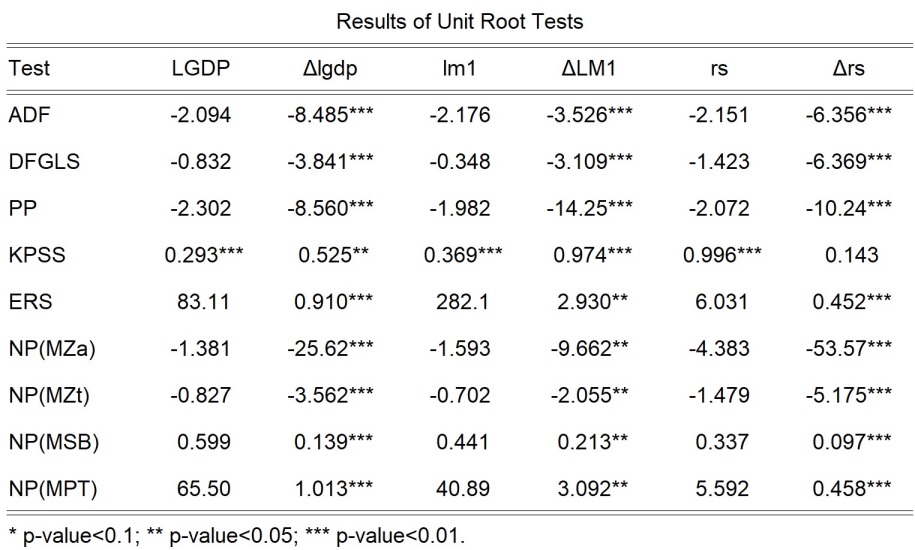
exec urtout(out=myout,tp) LGDP|t lgdp|1 lm1|t LM1|1 rs rs|1
These codes perform six unit root tests. The output table is transposed since the option tp is used. The resulting table is shown below:
The following is another example:
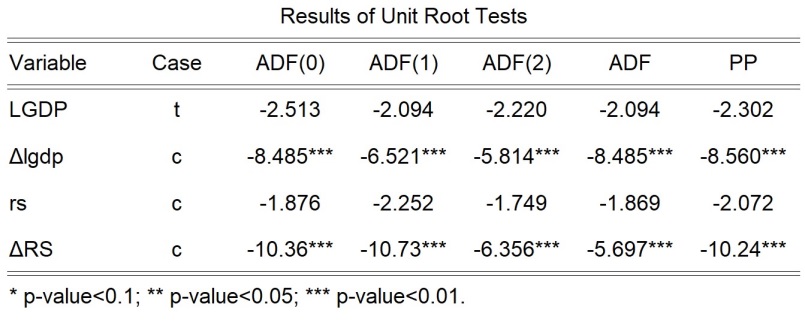
exec urtout(out=myout,tests=ap,adf=02,a_lagmethod=aic,case,tp) LGDP|t lgdp|1 rs RS|1The codes let the option adf be “02”. As a result, the ADF tests from lag order=1 to lag order=4 are performed. The option tests is specified as “ap”. Thus, the ADF and PP tests are performed based on the automatically selected lag parameters or bandwidths. Note that a_lagmethod is equal to “aic”. Therefore, the automatically selected lag order for the ADF is based on AIC, rather than the default specification SIC. Below is the output table:
Update History
- [October 21, 2022] Version 1.0.0.
- [October 18, 2023] Version 1.0.1. Updates: (a) some bugs are fixed; (b) tp is set to be ineffective when case is used.


- 版权声明:本作品使用知识共享(Creative Commons)的署名-非商业性使用-禁止演绎 4.0 国际许可协议。非商业转载请注明出处(作者及原文链接),商业转载请联系作者获得授权。

北京 海淀
13.9℃ 
博文+教程
阅读
给站长留言